Keep your sales, stock, and customers connected.
Run checkout, manage inventory across locations, sell wholesale, and connect your online store. Vendo brings the daily work of your business into one platform, with multi-currency payments and reports that help you decide what comes next.
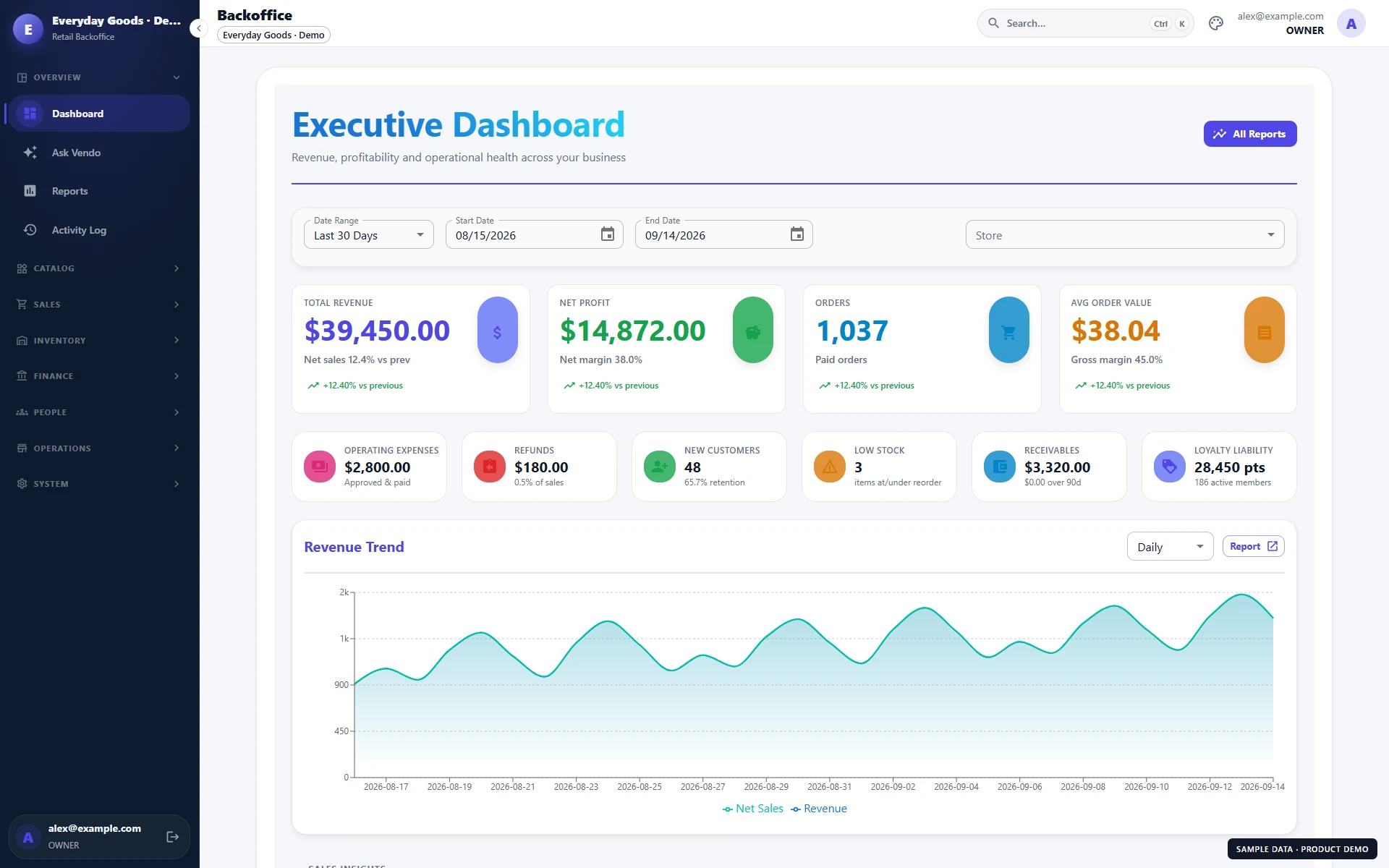
Take a quick tour of your next sales system.
A silent, captioned overview of the real Vendo interface with fictional sample data. See checkout, split payments, products, wholesale quotes, the online store, loyalty, staff, and reports.
Silent tour with on-screen captions. Read the transcript
The tools behind your working day.
For independent shops, growing store networks, and businesses selling both retail and wholesale. Explore the capabilities below, then use your demo to choose the modules and setup your business needs.
Checkout & cash management
Scan barcodes, hold and resume sales, process returns, and reconcile cashier shifts. A prepared register can keep taking cash sales offline.
Payments & multiple currencies
Split or partially settle a sale using your configured payment methods. Manage accepted currencies, exchange rates, customer credit, and cash on delivery.
Inventory across locations
Track stock by store and warehouse, manage variants and pack sizes, transfer products, count stock, and monitor lots and expiry dates.
Purchasing & supplier balances
Create purchase orders, receive deliveries in full or in part, record vendor bills, and keep track of supplier payments and outstanding balances.
Your connected online store
Publish a branded storefront on your own domain, using your existing product catalog and a connected store's stock. Offer guest checkout and customer accounts.
Wholesale & business customers
Use customer price lists, quantity breaks, quotes, credit limits, and payment terms. Track partial fulfillment and backorders alongside retail sales.
Loyalty, gift cards & offers
Reward repeat visits with points and tiers. Sell and reload gift cards, manage customer wallet credit, and run coupons and automatic promotions.
Reports & accounting exports
Review sales, margins, expenses, returns, and stock. Schedule report emails and export accounting summaries as CSV for your bookkeeper.
Staff, time & commissions
Set staff permissions and manager approvals, use PIN access, track time and commissions, and prepare gross-pay summaries for export.
Receipts, invoices & labels
Customize sales documents, print A4 invoices, and connect compatible receipt and label printers. Manage printer assignments for your terminals.
Customer notifications
Keep customers informed with order updates through configured email, SMS, and WhatsApp channels. Messaging availability depends on channel setup.
Ask Vendo AI reports
Ask about sales, top products, low stock, or expenses in plain language. The optional AI assistant uses your business reports to help explain the numbers.
Keep checkout moving. Keep track of every sale.
Give your cashiers the tools to handle everyday sales, different payment needs, and the end-of-shift cash count.
From barcode scan to receipt
Find products by barcode or search, choose quantities and units, attach a customer, and hold a sale for later. Manage returns and refunds with approval controls. Open and close cashier shifts with cash movements and a counted-versus-expected balance.
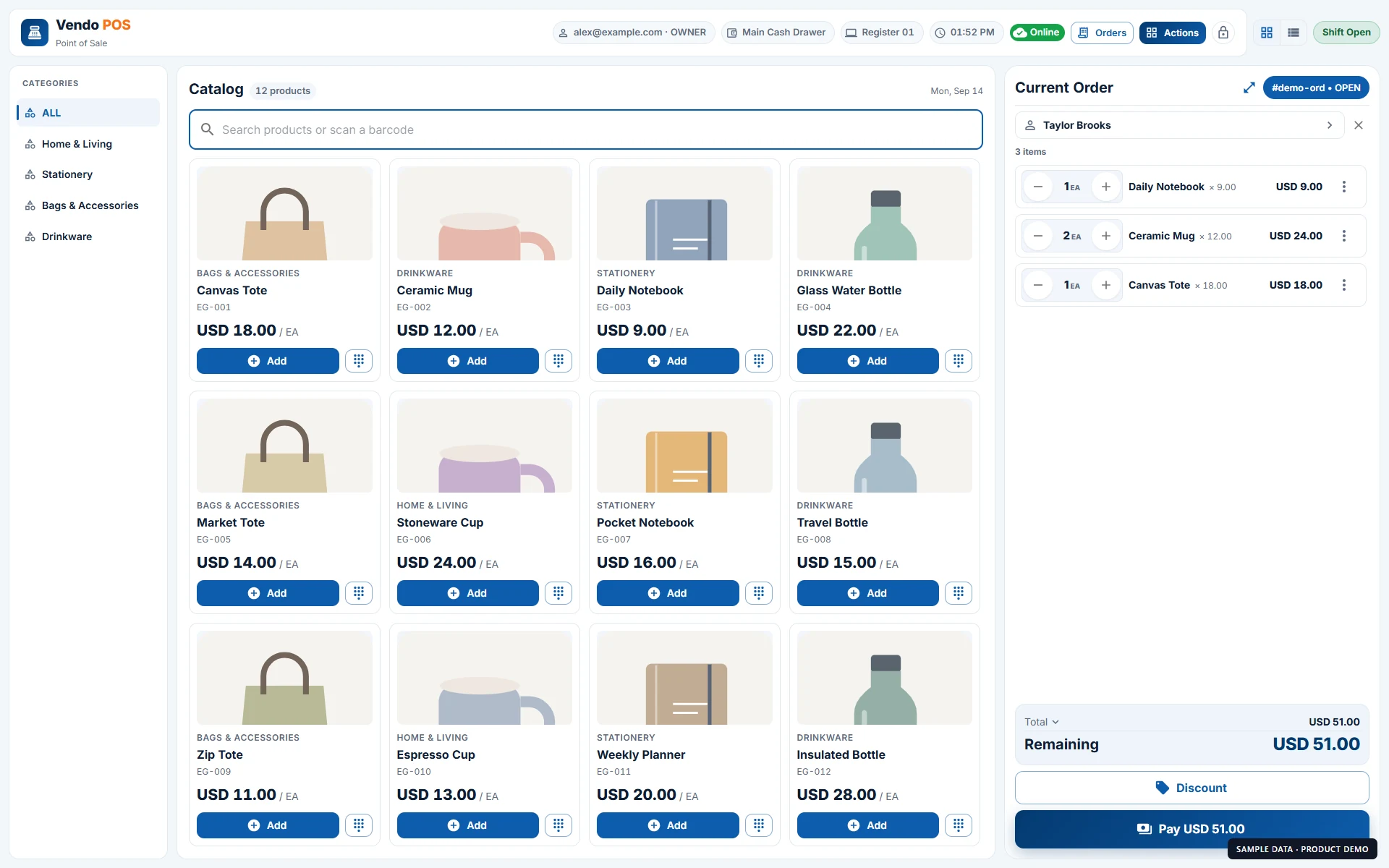 POS product catalog and a customer order · Sample data
Handle split payments and different currencies
Record cash and card tenders, apply customer wallet credit or gift cards where eligible, and collect payments in stages. Configure accepted currencies and exchange rates per store. Cash-on-delivery orders stay visible until collection is recorded.
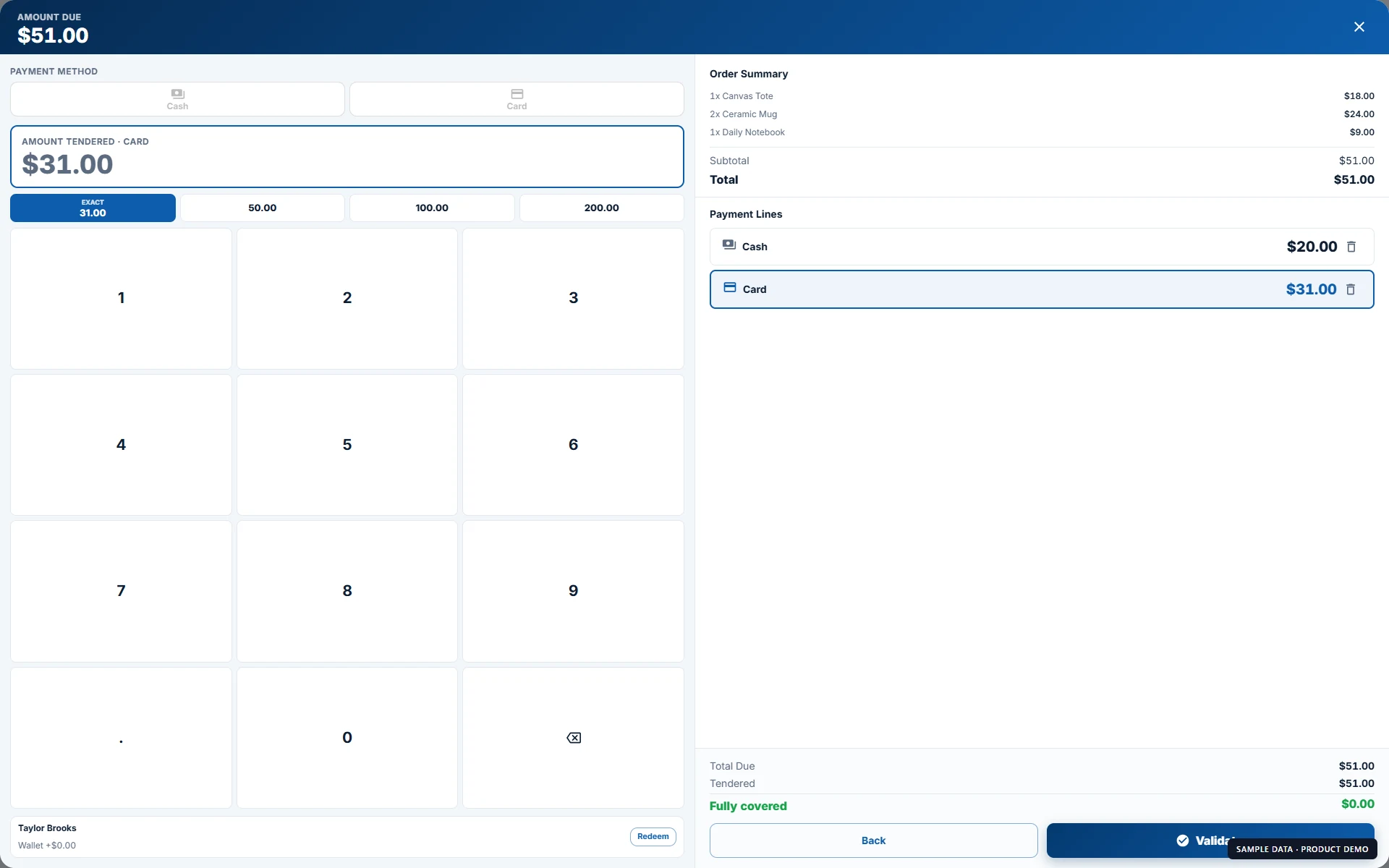 A sample $51 sale split into $20 cash and $31 card · Sample data
Keep taking cash sales with offline checkout.
Once your terminal is set up and its catalog is saved locally, cashiers can create cash sales during an internet interruption. Pending sales sync after reconnection. Card, wallet, and gift-card payments require an internet connection; your back office and online store also need connectivity.
Know what you have, what you owe, and what to reorder.
Connect purchasing, warehouse work, and store operations around a shared product catalog.
Stock control from delivery to shelf
Manage product variants, barcodes, and units such as individual items or packs. Receive purchase orders, track supplier bills, move stock between locations, and approve stock-count variances. Lot costs, expiry dates, and low-stock reports help you plan replenishment.
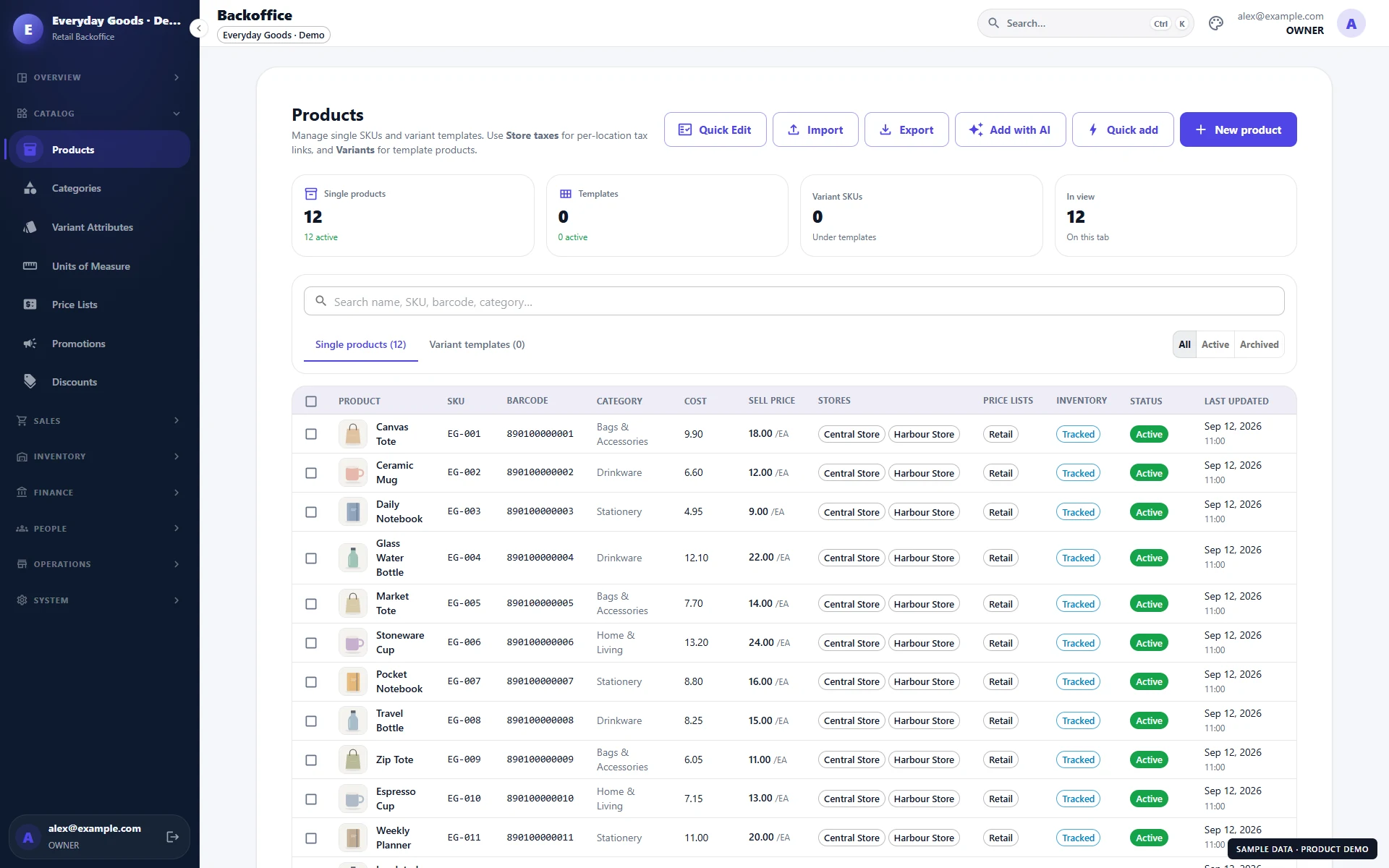 Product catalog with SKUs, barcodes, prices, and store assignments · Sample data
Sell online from your existing catalog
Build a branded storefront with configurable sections and your own domain. Use the catalog, pricing, and inventory of a connected store, with guest checkout, customer accounts, order lookup, and verified-purchase reviews. Manage online orders alongside your wider operation.
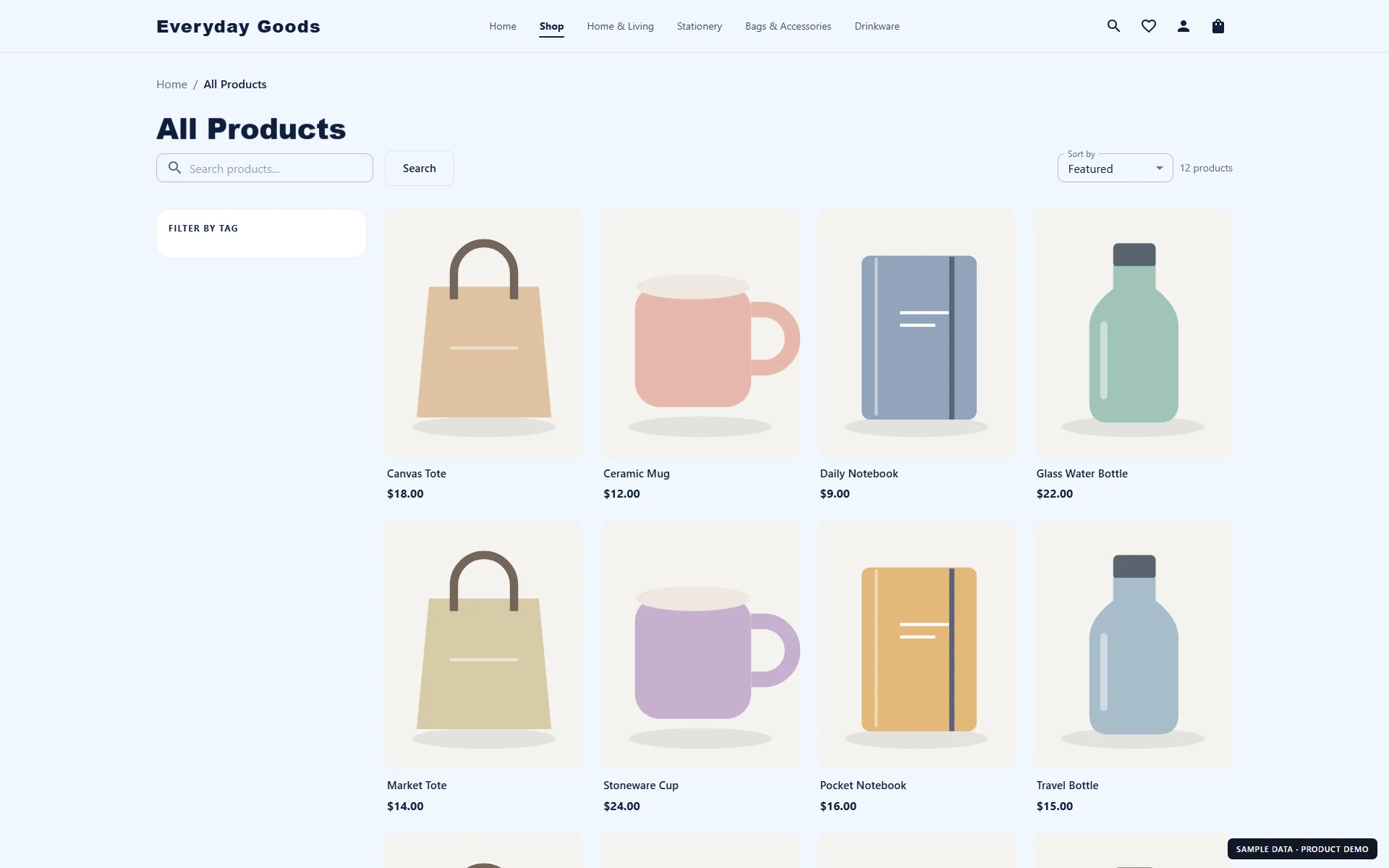 Branded online storefront showing the sample product catalog · Sample data
Give each team member the right access
Assign roles and permissions across stores, use PIN access at the register, and require manager approval for sensitive actions. Track time-clock entries and sales commissions, then prepare hourly or salaried gross-pay summaries with CSV export.
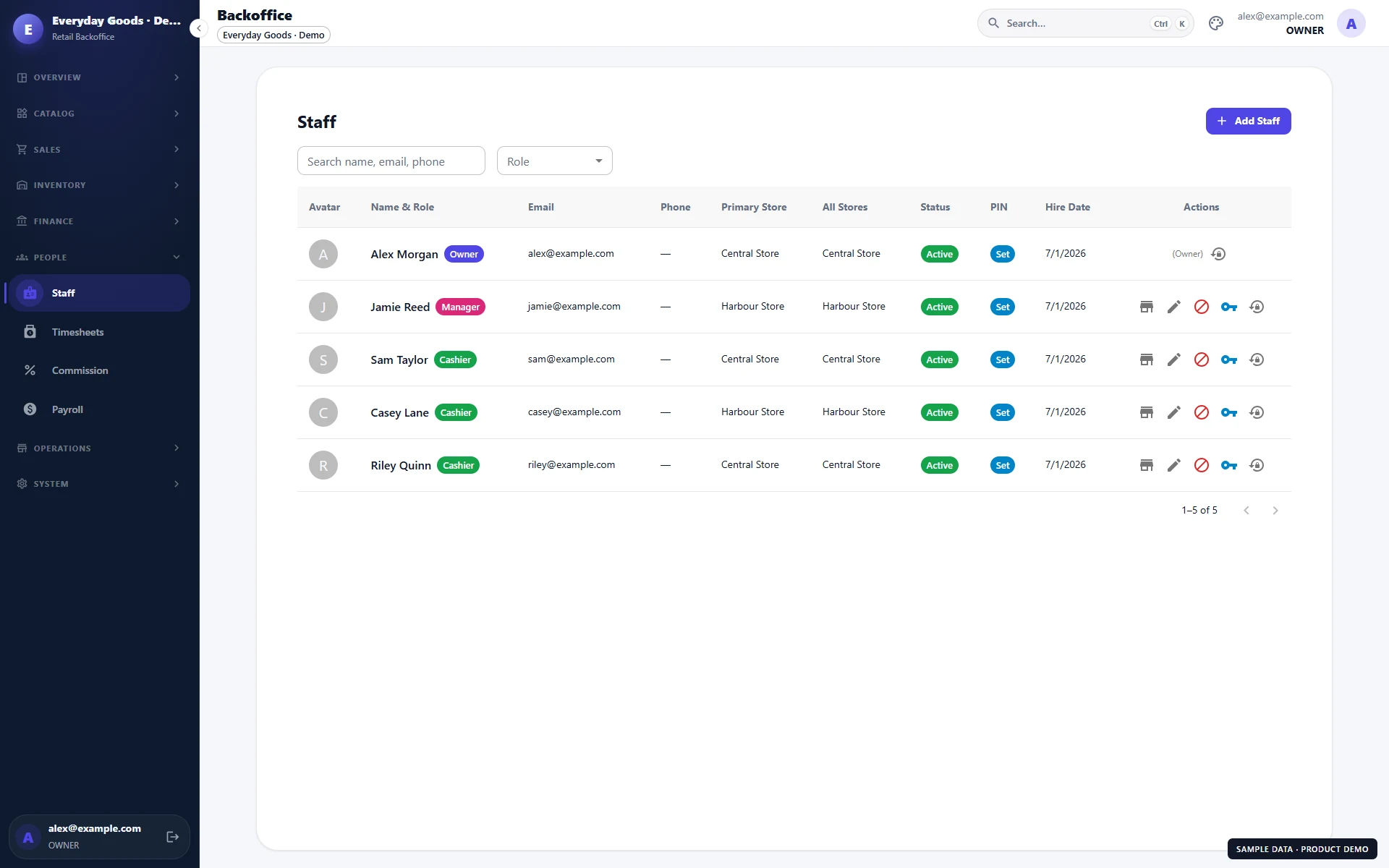 Staff list with roles, store assignments, and PIN status · Sample data
Serve walk-in shoppers and business accounts.
Use the same sales system for retail purchases and negotiated wholesale orders.
Pricing that follows the customer
Assign a wholesale customer their negotiated price list and quantity-based price breaks. Prepare a quote, convert it to an order, and sell in the units your buyers use. Customer credit limits, payment terms, and outstanding-balance tracking support sales on account.
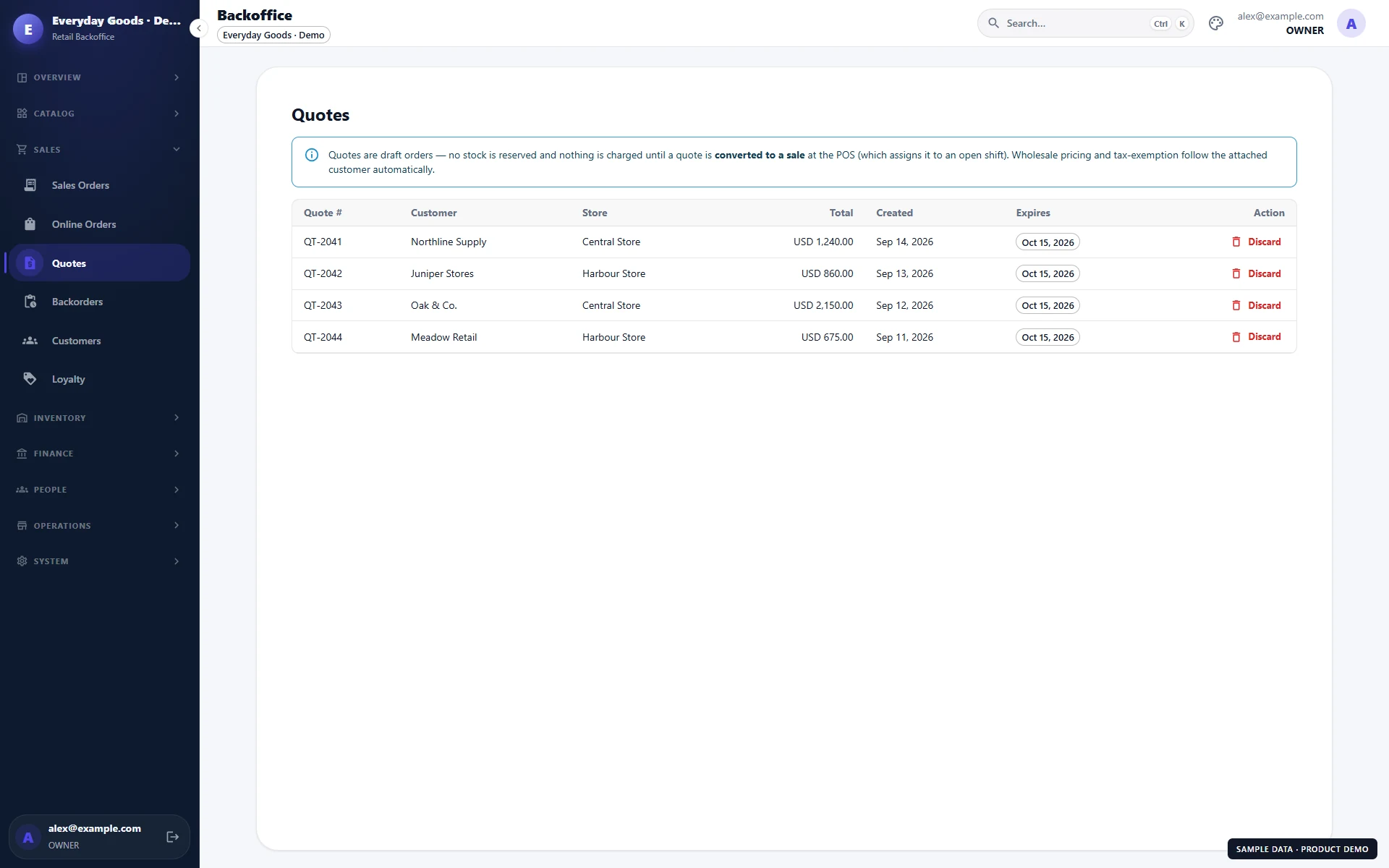 Wholesale customer quotes with totals and expiry dates · Sample data
Track what has shipped and what is still due
Record partial fulfillment and follow the remaining backorder quantities. Keep the order, customer balance, and collection history together so your team can see what still needs to be delivered or paid.
Give customers a reason to return. See what is working.
Connect customer rewards and promotions with the reports you use to run the business.
Rewards, offers, and gift cards
Set up points, rewards, and loyalty tiers; run coupons or automatic product and basket promotions. Sell, reload, and redeem gift cards across your organization's stores in its base currency. Track customer wallet credit, and enable order notifications through configured email, SMS, or WhatsApp channels.
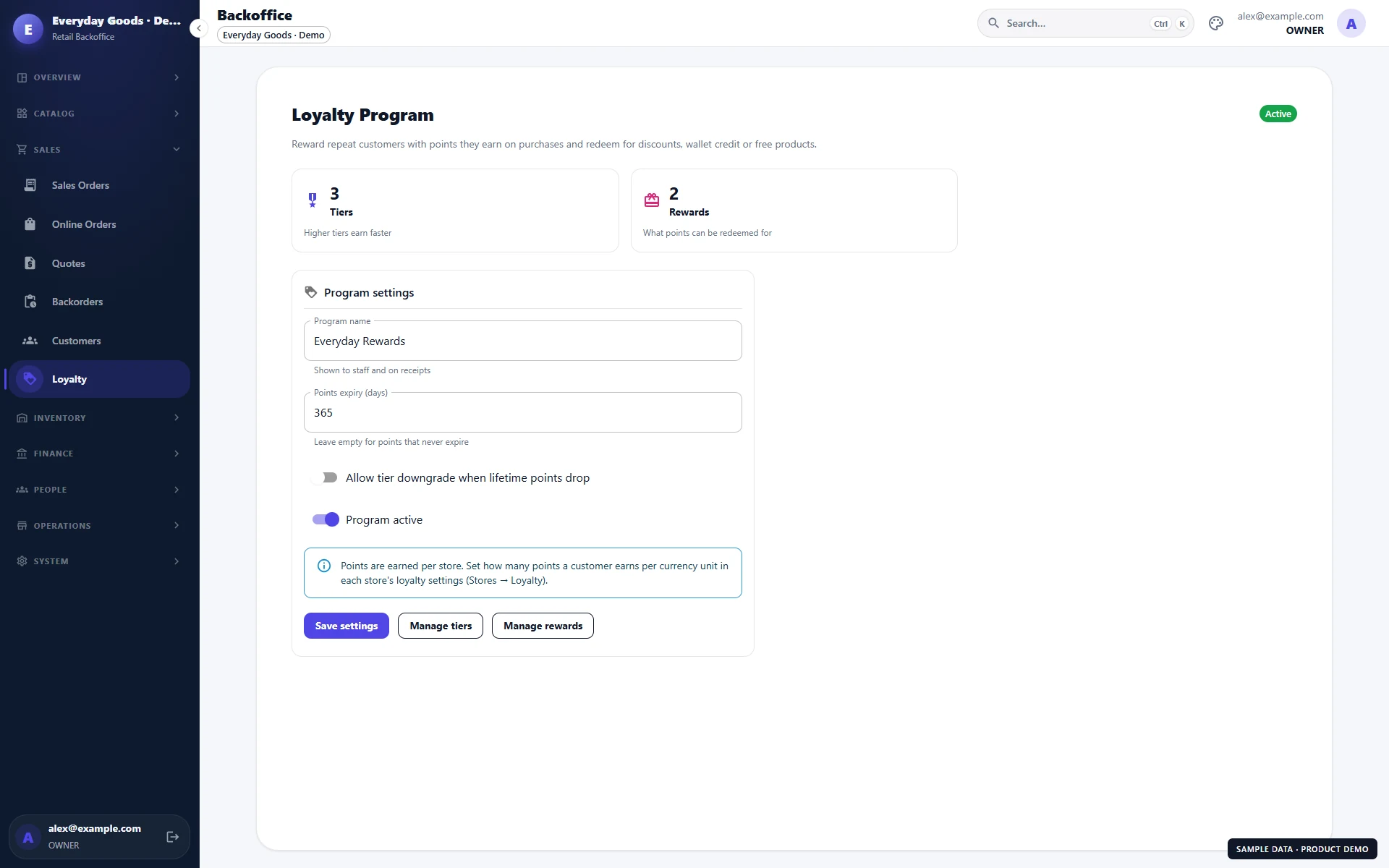 Loyalty program settings with tiers and rewards · Sample data
Understand sales, costs, and margins
Compare stores, review best-selling products, and follow sales, expenses, returns, and profit-and-loss reports. Schedule report emails for your team. Export mapped sales, cost-of-goods, returns, and expense summaries as CSV for your accounting workflow.
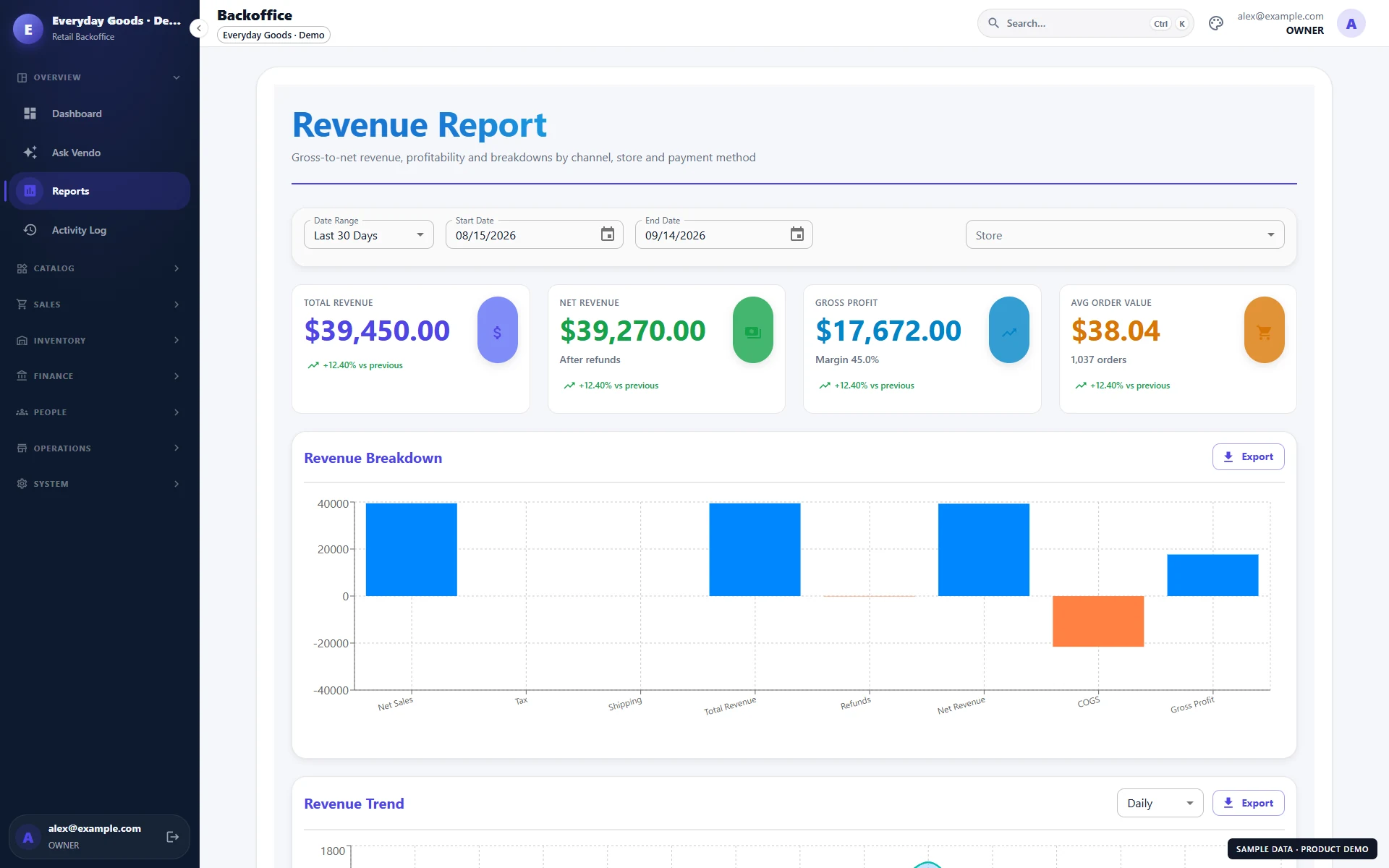 Revenue report showing sample revenue, gross profit, and sales breakdowns · Sample data
Ask a business question in your own words.
"Which products sold best this month?" "What is running low?" "How did sales compare with last month?" Ask Vendo uses your existing reports to answer questions about your business. Owners and managers can explore the numbers through a read-only conversation. AI access is enabled separately and usage is metered.
Questions before your demo
Vendo is designed for retail shops, businesses with multiple stores or warehouses, and wholesalers that need customer pricing and credit terms. It also includes a connected online storefront. Book a demo to walk through your products, locations, and sales process.
A terminal that has already been set up and loaded its catalog can continue taking cash sales offline, then sync pending sales after reconnection. Card, wallet, and gift-card payments require connectivity. The back office and online storefront need an internet connection.
Yes. Configure the currencies, exchange rates, and payment methods accepted at each store, including split and partial payments. Customer wallet and gift-card payments have currency restrictions. We can review your currencies and payment setup during the demo.
Yes. Manage location-level inventory, stock requests and transfers, staff access, and store reports within one organization. The number of locations and available modules depend on your plan and configuration.
Yes. Wholesale customers can have their own price lists, quantity breaks, credit limits, and payment terms. You can prepare quotes, convert them into orders, collect account payments, and track partial fulfillment and backorders.
Yes. A storefront uses your product catalog and the stock and pricing of its connected store. It supports your own domain, configurable page sections, guest checkout, customer accounts, order lookup, and verified-purchase reviews.
Product import tools help you bring in your catalog. Printing includes A4 documents and compatible thermal receipt and label printers. Hardware compatibility depends on the printer, connection, and browser, so bring your printer models and a sample product file to the demo.
Vendo tracks sales, expenses, supplier balances, and profit-and-loss reports, with accounting summaries exported as CSV. Staff tools cover time tracking, commissions, and gross-pay exports. Tax withholding, payroll payouts, and live accounting-system synchronization are outside these features.
Ask Vendo lets owners and managers ask questions about sales, products, stock, customers, and expenses using existing business reports. It is read-only. AI access requires separate enablement, an internet connection, and metered usage.
Vendo supports customer notifications through configured email, SMS, and WhatsApp channels. SMS and WhatsApp require messaging setup; WhatsApp may require an approved business sender and message templates. Messaging usage is billed separately.
Book a demo to discuss your locations, registers, team, and required modules, and request a quote for your setup. We can walk through your workflow and discuss catalog import, hardware, and rollout requirements before you decide.